Breeze: Android browser that combines browsing with device tools
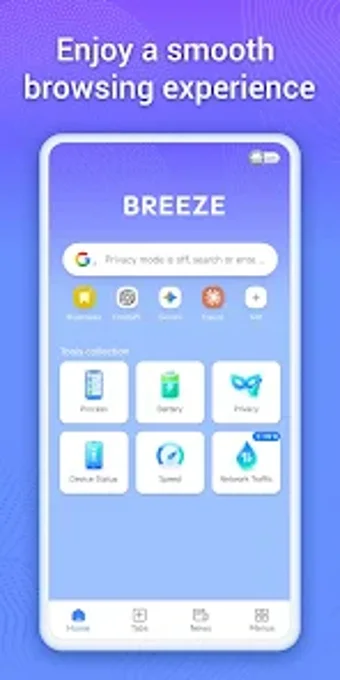
Breeze: AI Smooth Path Browser, from ALASKA SYSTEMS AND SOFTWARE LLC, is an Android utility designed to reduce app clutter and centralize browsing plus device oversight. The app functions as a fast web browser while exposing an All-in-One AI hub, built-in process management, and live battery and hardware reporting inside a single interface. Key capabilities include AI platform aggregation, swipe news, and quick bookmark organization. It targets Android users who want a consolidated, performance-focused companion for daily device upkeep.
What does Breeze actually provide?
Breeze combines a standard web view with a collection of device tools, offering browsing plus a dedicated All-in-One AI hub that aggregates major AI platforms and social links. The home screen presents a clutter-free layout for quick site access and bookmark organization. The tool bundles a swipe-enabled news feed and device reporting so users can move between web content and system information without switching apps.
Does it affect device responsiveness during cleanup?
The app includes a built-in process manager that scans background activities and lets users close non-essential tasks, a design intended to reduce active background load. Device insights report battery health in real time, allowing users to spot drain sources while operating the browser. Because task closure is manual, the app shifts the decision to the user rather than automatically terminating services in the background.
Is the app’s approach to external services and security clear?
The AI hub works by providing quick links to third-party platforms and social sites, so parts of the experience depend on external services opening in the browser. The app presents hardware and battery statistics locally, giving visibility into device state. Relying on external AI or social endpoints means the browsing session hands off to those sites for content and interaction rather than running those services natively inside the app.
Do users need technical skill to operate it correctly?
The clutter-free home screen and quick bookmarks suit casual users for browsing and news consumption. Manual background-task management requires a basic understanding of running processes to avoid closing needed services, so intermediate users gain the most benefit from optimization controls. Power users can treat the app as a single hub for daily maintenance while keeping direct control over which processes to stop.
Breeze is a practical consolidation option for hands-on Android users
Breeze is a practical consolidation option for Android users who prefer centralizing web access and on-device monitoring into one tool. The design favors users comfortable making manual choices about background tasks, so novices should proceed carefully when stopping processes. For those who accept that trade-off, the app reduces the need to switch among separate utilities and serves as a single point of daily device oversight. Recommended.